
If you use our online services via the HM Land Registry portal, or to search for property information, we recommend you access these services through one of the browsers we support for the best experience.
We keep an updated list of the browsers we support in our technical manual. On 30 July 2017 we officially support the current major version and the previous major version of the following browsers:
- Microsoft Internet Explorer
- Microsoft Edge
- Mozilla FireFox
- Google Chrome
- Apple Safari
Our update on 30 July will disable the security protocols TLS1.0 and TLS 1.1. If you do not use one of our supported browsers, you will not be able to access Business e-services through the portal, or search for property information with our online services unless:
- your browser supports the ‘TLS 1.2 protocol’
- the relevant setting is enabled within your browser
Example
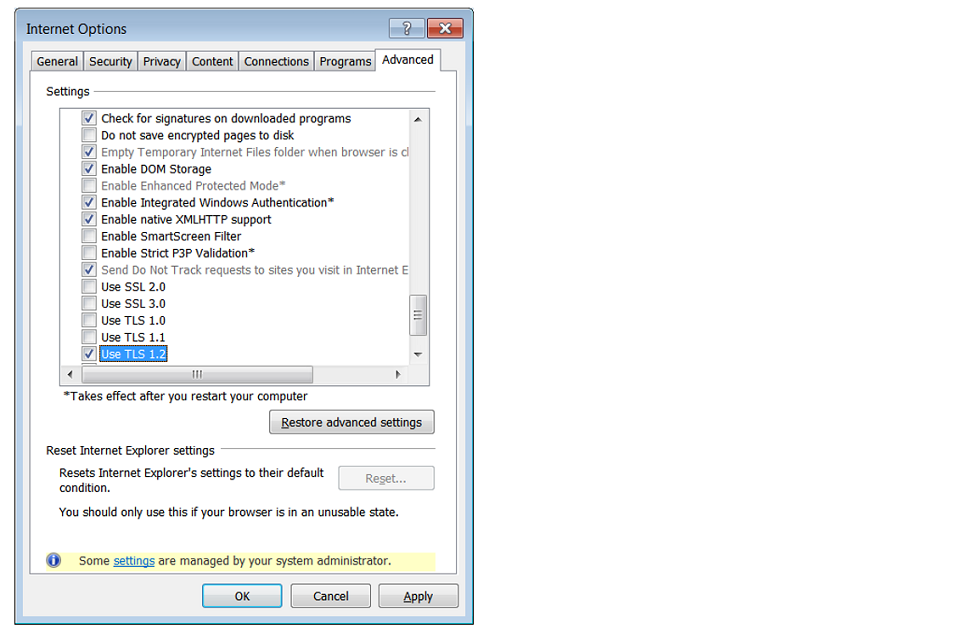
In Internet Explorer, the setting ‘Use TLS 1.2’ must be enabled. Go to Settings > Internet Options > Advanced> security heading and tick ‘Use TLS 1.2’.
Please note that we cannot offer technical support for enabling these settings, or for any issues you experience when using an unsupported browser.
Customers using Business Gateway will be unaffected by the updates.